When you merge two PDFs, you check that the pages are there and in the right order. You rarely check whether the bookmark sidebar still works, whether "see page 5" still jumps to page 5, or whether the form can still be filled in. Those parts are stored separately from the pages, and they are what most often goes missing.
Why pages survive and the rest does not
A page's text and images belong to the page itself. Bookmarks, links that point to other pages, and form fields are tied to the whole document: the bookmark list sits at the top of the file and points into it, and a form is a document-level list of fields whose boxes appear on pages.
The simplest way to merge or split is to copy pages into a new, empty document. That carries each page's content and its visible boxes. But unless the tool also rebuilds the bookmark list, re-points the links and rebuilds the form, those document-level parts stay behind in the source.
What we tested
We built a six-page test document with six bookmarks, a link to a website, a link that jumps from page 1 to page 5, and a fillable name field on page 3. We then merged it with a copy of itself, extracted pages 1 and 5, deleted page 2, and rotated every page. We did each operation with two tools: the Tekivex tools, and pypdf 6.17.0, a widely used open-source PDF library for Python.
| Operation | What we checked | Tekivex | pypdf |
|---|---|---|---|
| Merge with a copy | Bookmarks | None kept | All 12 kept |
| Jump links | Present, but go nowhere | Both work | |
| Name field | Visible, but not fillable | Kept, but both copies share one field name | |
| Extract pages 1 and 5 | Bookmarks | None kept | The 2 for the extracted pages kept |
| Jump link, page 1 to page 5 | Goes nowhere | Works | |
| Delete page 2 | Bookmarks | None kept | All 6 kept, and 1 now points to the deleted page and does nothing |
| Jump link | Goes nowhere | Works | |
| Name field | Visible, but not fillable | Kept and fillable | |
| Rotate all pages | Everything | All kept | All kept |
Links to websites survived every operation in both tools. Page content came through unchanged in every Tekivex operation: we compared each page's drawing instructions byte by byte.
The Tekivex operations ran on 10 October 2026 and the pypdf ones on 23 October 2026. The Tekivex results, pypdf results, the test file and both scripts (Tekivex, pypdf) are published. It is one synthetic file; other files and other tools may behave differently.
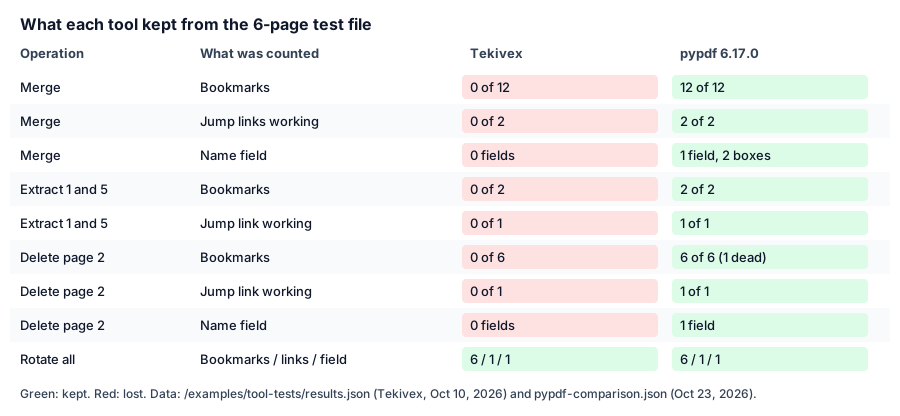
The results table below as a chart, generated from the two published result files.
Reading the results
Rotation is safe everywhere. Rotating only changes a number on each page, so nothing else is touched.
Copying pages loses document-level parts. That is what Tekivex's merge, split and delete tools do, and why they drop bookmarks, jump links and form fields. We state this on each tool page.
Keeping everything has its own traps. pypdf kept more, but merging two copies of the same form produced two fields with the same name. PDF field names are meant to be unique, so viewers may treat the pair as one field or behave unpredictably. And after deleting page 2, pypdf kept that page's bookmark, which now leads nowhere.
What to do
- Fill in forms before merging with Tekivex. After a Tekivex merge the boxes stay visible but can no longer be edited. We did not test a form that was filled in before merging, so check that your entries still show.
- Rotate rather than split and re-merge when only the orientation is wrong. Our Rotate PDF tool turns every page at once and keeps everything.
- Check the parts you rely on. After merging or trimming, click two or three bookmarks and one internal link, and try typing in one field.
- Merge forms that have the same field names with care. If two documents both have a field called "name", the merged file may link them.
Frequently asked questions
Why does Tekivex drop bookmarks when merging?
Our tools copy pages into a new file and do not rebuild the bookmark list, links or forms. It is a limitation, not a choice we recommend; each tool page states it.
Will my merged file look different?
No. In every Tekivex test the page content was byte-for-byte identical. What changes is the navigation and form layer around the pages.
Sources
- pdf-lib, the open-source JavaScript library the tool uses to read and write PDFs in your browser: version 1.17.1, MIT licence, checked on the package registry on November 2, 2026
- pypdf, the Python PDF library used for comparison (source): version 6.17.0, BSD-3-Clause licence, checked on the package registry on November 2, 2026
How this guide was made
This guide was drafted with an AI assistant from the tests described above, then checked line by line against the tests' published results. It is credited to the Tekivex team rather than to a named person because no individual author wrote it or repeated the operations in a desktop PDF reader. If you find a mistake, tell us and we will correct it and note the change.