People delete pages from PDFs for a reason. It might be a pricing annex before a proposal goes to a second bidder, a salary page before a contract goes to a broker, or a page of ID scans that a portal did not need. The natural assumption is that once a page is gone from the file, everything on it is gone too. Usually that is true. We found a case where it was not, in our own tool and in a popular PDF library, and fixed ours.
What a PDF page is made of
A PDF page is not a picture. It is a short list of drawing instructions, such as "write this text here, draw image Im1 there". Next to it sits a resource list that says what Im1 and the fonts actually are. The images and fonts are stored once in the file, and pages point to them by name.
Most files give each page its own resource list. Some give every page the same list, which names every image in the document. In that layout a page can point at an image it never draws. A viewer shows nothing, because no instruction draws it, but the image is still in the file.
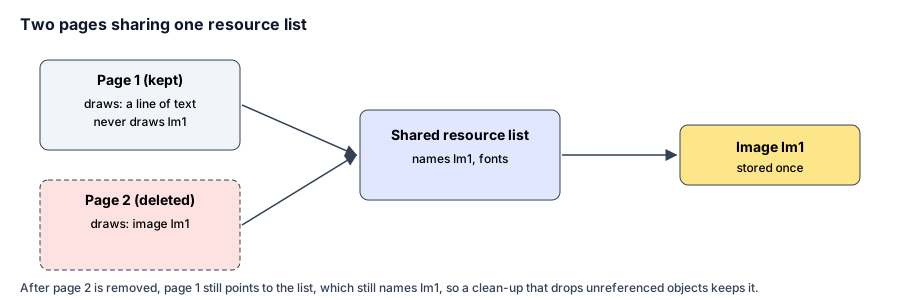
The layout of the test file. Only page 2 draws the image, but both pages point to the list that names it.
What we tested
We built a two-page test file in that shared layout. Only page 2 draws an image; page 1 has a line of text. Then we deleted page 2 with several methods, and counted the images left in each result.
| Method | Images left after deleting page 2 |
|---|---|
| The source file | 1, drawn only on page 2 |
| Tekivex Delete Pages before our fix | 1 |
| Tekivex Delete Pages now | 0 |
| pypdf 6.17.0, a widely used open-source PDF library: copy the file, remove page 2 | 1 |
pypdf: the same, then its clean-up option remove_unreferenced |
1 |
| pypdf: start a new file and add page 1 only | 1 |
In every case where an image was left, the leftover image was byte-for-byte the original. It does not appear on any page, but anyone with a PDF tool can list and save it.
The comparison results and the script that produced them are published. The test file is synthetic, built to have this layout. We have not measured how many real-world PDFs are written this way.
Why the clean-up option did not help
PDF libraries often have an option to drop objects nothing refers to. Here the image is still referred to: page 1's resource list names it, even though page 1 never draws it. So, from the file's point of view, the image is still in use and is kept.
Our fix works the other way round. When Tekivex keeps a page, it reads that page's drawing instructions, gives the page its own resource list containing only the images it actually draws, and then removes every object nothing points to any more. The same applies when you extract pages, which is deletion seen from the other side.
What we did not find, and did not test
In a second test, on a six-page file with a unique marker word on every page, Tekivex removed page 2 and the marker from that page appeared nowhere in the output (results). Text sits in a page's own drawing instructions, so it leaves with the page.
Fonts are shared between pages in the same way as images. We did not test whether a shared font can keep characters that were used only on a deleted page.
How to check a file you are about to share
- Delete the pages, then open the new file and confirm the right pages are gone.
- If the deleted pages held images that matter, such as ID scans, signatures or photos, list the images left in the file. With Python and pypdf:
from pypdf import PdfReader

reader = PdfReader("trimmed.pdf")
for page_number, page in enumerate(reader.pages, start=1):
    for image in page.images:
        print(page_number, image.name)
This lists the images each remaining page refers to, including ones the page never draws. If an image you deleted appears, the file still carries it.
- For anything that must not leak, delete the pages with a tool that rebuilds each page's resources, as ours now does, and run the check again.
Deleting is not redacting
Deleting removes whole pages. If the sensitive part is on a page you are keeping, you need redaction, which removes that text or image from the page itself. Drawing a black box over it in an ordinary editor usually leaves the original underneath, where it can be copied out.
Frequently asked questions
Is my file affected?
Only if its pages share one resource list and a deleted page drew something the others did not. You cannot tell by looking at the pages. The check in step 2 tells you.
Does this affect Tekivex's other tools?
Delete Pages and Split PDF both had it, and both are fixed. Merge PDF keeps every page, and Rotate PDF changes no content, so neither drops anything to leak.
Sources
- pdf-lib, the open-source JavaScript library the tool uses to read and write PDFs in your browser: version 1.17.1, MIT licence, checked on the package registry on November 2, 2026
- pypdf, the Python PDF library used for comparison (source): version 6.17.0, BSD-3-Clause licence, checked on the package registry on November 2, 2026
How this guide was made
This guide was drafted with an AI assistant from the tests described above, then checked line by line against the tests' published results. It is credited to the Tekivex team rather than to a named person because no individual author wrote it or repeated the check on their own documents. If you find a mistake, tell us and we will correct it and note the change.